AI automation and agent orchestration

Build and run AI workflows that work in production.

Funkshin helps teams create, deploy, coordinate and monitor AI agents with business processes in one workspace.

Start with one practical workflow, then expand as your needs grow.

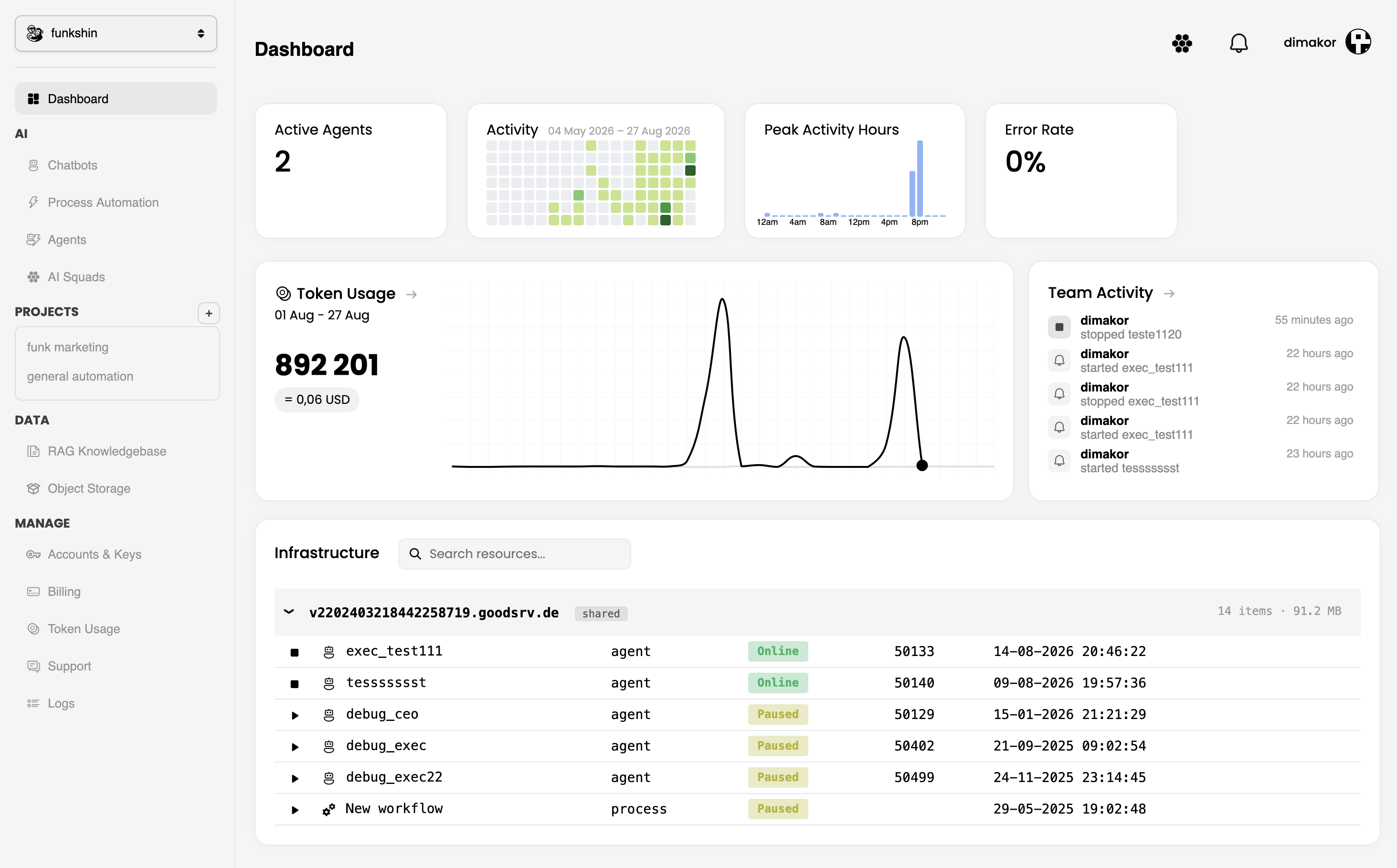
app.funkshin.com / overview
Workspace overview
Workspace / Dashboard

Your systems at a glance.

FS
Active agents12in workspace
Tokens this month8,492usage view
Time saved142hillustrative view
Error rate1.2%illustrative view
Token usageCurrent · Previous month
Team activityLive view
FS
Support agent is onlineWorkspace activity
Lead workflow completedWorkflow activity
New agent deployedDeployment activity
Your infrastructureWorkspace resources
ResourceTypeStatus
Support agentAI agentOnline
Lead workflowProcessPaused
The problem: real. The fix: clear.

Existing problems, solved in one place.

Every AI project tends to hit the same walls. Instead of patching each one, Funkshin solves them all inside a single platform — from first prototype to reliable operation.

01

Too many disconnected parts

Teams end up wiring together a separate runtime, workflow logic, credentials, storage, and monitoring for every new automation. That overhead grows with each one and never stops.

Funkshin

Runtime, workflow logic, credentials, storage, and monitoring already live together, so every new automation shares one connected setup.

02

Context gets lost between steps

Work breaks down when one specialist's output doesn't carry the context the next step needs, and no one has a clear shared view of the process.

Funkshin

Agents get defined roles and shared context built in, so work flows cleanly between "specialists".

03

Failures are difficult to see

Once a workflow is running, teams can't easily tell what is active, what finished, and where the pipeline quietly needs attention.

Funkshin

Run and observe agents in one place, with activity, health, and errors visible at a glance.

One platform, every workflow

Everything your agents need to do useful work.

Organize the work, connect the right data, and give every agent a clear path from context to action.

01

Group agents' work by project

Keep agents, workflows, data, and activity organized around the projects your team is actually moving forward.

Support operationsLead workflowProduct launch
02

Stream your data right into agents

Connect live business data and knowledge so agents can act with the context they need, when they need it.

Data streamAgent
03

Embed agents into your website

Put a capable AI agent directly where your customers and users already work, without building the runtime yourself.

</>yourwebsite.com
04

Create teams of AI agents

Combine specialists into coordinated teams that share context, divide responsibilities, and hand off work cleanly.

CEOEXECOPS
05

Import skills

Extend what your agents can do by bringing in reusable skills for tools, processes, and specialized tasks.

+ResearchCRM updateReporting
Practical automation

Build agents for the work your business already does.

Use specialized agents to create content, run campaigns, qualify opportunities, and keep recurring operations moving.

Automate blog production

Research a topic, review existing content, create an outline, draft the article, generate metadata, and send it for approval.

Run marketing campaigns

Turn a campaign brief into channel-specific posts, email drafts, creative ideas, publishing tasks, and performance summaries.

Qualify and follow up with leads

Monitor incoming inquiries, research the company, score fit, draft a personalized response, and create follow-up tasks.

Operate internal workflows

Read requests from forms or email, assign the right agent, gather information, complete routine actions, and report exceptions.

How it works

Start with one workflow. Improve what works.

  1. 01

    Describe the outcome

    Define the work you want to remove, accelerate, or make more consistent.

  2. 02

    Build the process

    Configure the agents, tools, knowledge, and actions that make the workflow useful.

  3. 03

    Run and observe

    Watch activity, review results, and find the steps that need attention.

  4. 04

    Expand with confidence

    Add workflows and specialized agents as your team proves new opportunities.

Built for security

Protect your data.
Stay in control.

Every agent request is token-authenticated, models retain none of your data and all activity is auditable. This gives your organization strong security protections and full operational control.

Start free on shared hosts. Your first two agents can run on shared cloud infrastructure. When you need more control or capacity, provision an isolated VM in just a few clicks.

Review pricing
01Clear visibility

Activity, usage, health and errors in one calm view.

02Remote cloud hosting

Agents run on managed remote infrastructure without requiring you to operate your own servers.

03Strict token-based authentication.

Every message to an agent requires a valid bearer token. Unauthorized access is automatically blocked.

04Zero data retention

We exclusively use ZDR LLM providers. Your prompts and outputs are never stored or used to train models.

Questions, answered

What to know before you build.

What is Funkshin?

Funkshin is an AI automation and agent orchestration platform for building, deploying, coordinating, and monitoring AI-powered business workflows.

What can I build with Funkshin?

You can build workflows around support operations, lead processes, backend actions, knowledge retrieval, scheduled tasks, and other repeatable business processes.

Can multiple AI agents work together?

Yes. Funkshin is designed to coordinate specialized agents and pass work between them as part of a larger workflow.

How does pricing work?

Start with shared hosting for your first two agents, then choose a dedicated VM as your workload grows. Token rates also improve with higher usage volumes.

Do I need to be a developer?

Funkshin is designed to make workflow creation more accessible, while technical customization can be used for more advanced processes.

How do I get started?

Start by creating a workspace, then define one workflow with a clear outcome. You can add agents, tools, and knowledge as the process develops.

Your next system starts here

Turn one repetitive process into a system that keeps working.

Build a practical AI workflow and see what your team can improve next.